JupyterLab DataMount Extension
Overview
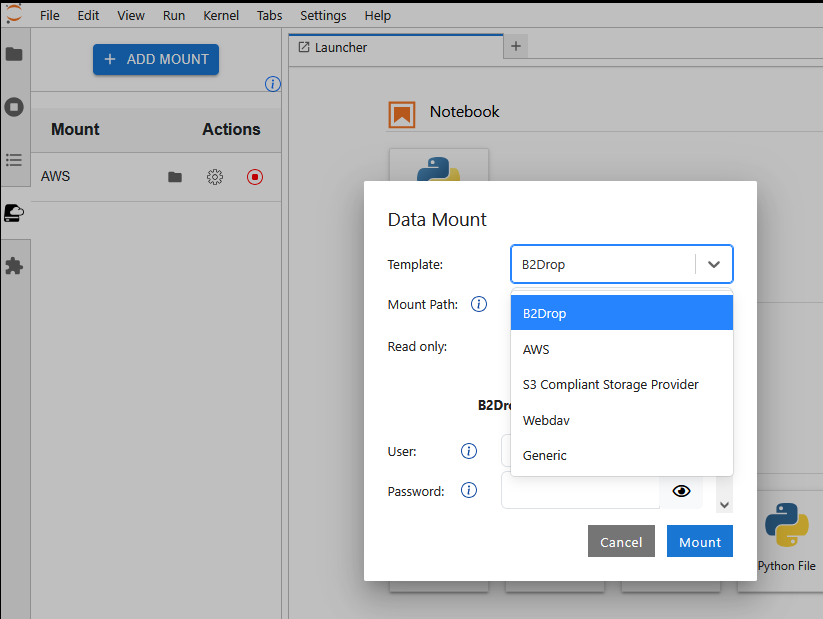
The JupyterLab DataMount extension is designed to provide seamless access to external storage services directly within JupyterLab. By integrating multiple storage backends, it allows users to mount and interact with remote data effortlessly. The extension is especially useful for researchers and data analysts who need quick and secure access to large datasets.
Why Use JupyterLab DataMount?
- Easy Storage Integration: Supports various storage backends, including WebDav, AWS, S3-compatible storage and many more.
- User-Friendly Interface: Provides a simple UI for managing data mounts without requiring complex configurations.
- Seamless JupyterHub Integration: Works effortlessly with JupyterHub, allowing admins to preconfigure storage access.
- Sidecar-based mounting: The JupyterLab user container remains unprivileged, while the separate mount sidecar runs with elevated privileges required for filesystem mounts.
- Flexible Usage: Works for different user needs, including read-only access, temporary mounts, and persistent storage.
Who Should Use This Extension?
JupyterLab DataMount is designed for:
- Researchers and Data Scientists who need to work with large datasets stored in remote locations.
- Educators and Students who require seamless access to educational resources and cloud storage.
- JupyterHub Administrators who want to preconfigure storage access for users while maintaining security.
Security Features
JupyterLab DataMount is built with security in mind:
- Separate mount sidecar: Mount operations run in a sidecar container and the mounted volume is propagated into the JupyterLab container.
- Different privilege levels: The JupyterLab user container does not need to be privileged. The sidecar runs as root with elevated mount capabilities (
SYS_ADMIN,MKNOD, andSETFCAP) andallowPrivilegeEscalationenabled because kernel mounts require them. Treat the sidecar image and its API as privileged infrastructure. - Preconfigured mounts: Administrator-provided mount configuration is marked external and its credentials are redacted from the mount-list API response. Users can open these mounts but cannot remove them through the DataMount API.
- User credentials: Credentials entered by a user are used by the sidecar to create the mount. If the administrator enables “Remember mounts,” those settings, including credentials, are stored in plain text in the configured user-persistent file.
Use Cases
JupyterLab DataMount is ideal for:
- Data Science & Research: Access remote datasets for analysis and visualization without downloading them manually.
- Cloud-Based Workflows: Mount cloud storage solutions (AWS S3, WebDav, B2Drop, etc.) to work on data stored remotely.
- Collaborative Environments: Enable teams to access shared storage locations securely within JupyterLab.
- Read-Only Data Access: Provide users with access to preconfigured datasets without exposing credentials or write permissions.
This extension enhances productivity by simplifying how data is accessed and managed within JupyterLab, while maintaining strong security practices.
For detailed documentation, refer to the specific sections on Installation, Using the Extension and Security Details.